abc MICROSOFT EXCEL 2010 - Show/hide parts of the window
Choosing the parameters
All parameters in the VIEW TAB make the work in EXCEL easier. In VIEW TAB we can change the look of the page, zoom /ZOOM/, view lines, formulas /FORMULA BAR/, GRIDLINES, etc. VIEW TAB is activated on the VIEW button in the TOOLBAR. VIEW TAB is shown in the following picture.
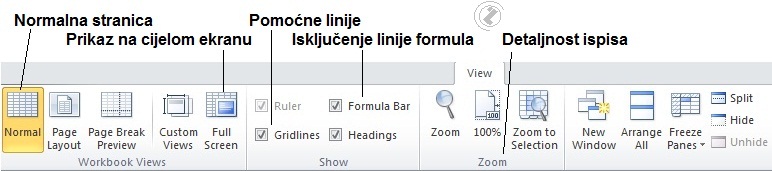
Picture 1. VIEW TAB
 Active switch /CHECK BOX/
 Non-active switch /CHECK BOX/
Choosing the view and effects can be seen in the following animations: